
WSK10 Getting Started
BRD41 Device Overview
The BRD41 is a high-performance, industrial-grade Wi-SUN Border Router designed to serve as a robust bridge between massive Field Area Networks (FAN) and the enterprise cloud. Engineered for the “Smart Grid” and IIoT, this Linux-based gateway supports up to 1000 nodes with full Wi-SUN FAN compliance, ensuring seamless IPv6 communication across long-range mesh deployments. The device is built for extreme reliability in harsh environments, featuring a DIN rail mountable chassis, wide-ranging power input, and integrated superCAP based UPS to protect against electrical noise and irregularity. With versatile backhaul options including Dual 1000M Ethernet and 4G/LTE, alongside isolated RS485 ports for legacy integration, the BRD41 offers developers a flexible, industrial-hardened platform that accelerates time-to-market for smart city and utility infrastructure projects.
Quick Assembly
To assemble the BRD41 in the WSK10 evaluation kit, follow these steps:
1. Inventory Parts
The BRD41 kit includes the following components:
- BRD41 unit
- Multi-purpose antenna
- Ethernet cable
- Wi-SUN antenna
- DC power supply
- DIN rail adapter mount (optional for mounting)
2. Verify the Wi-Fi Antenna
Before beginning, ensure the antenna cable labeled “BT & WIFI” is equipped with the required extra adapter.
3. Prepare the BRD41
Remove the BRD41 unit from its packaging.
4. Install the DC Power Cable
- Locate the green block connector on the unit and the corresponding DC cable in the kit. Insert the stripped ends of the power cable into the block connector, fasten screw terminals to secure.
- Insert the block connector into the unit and secure it using a flathead screwdriver.
- The cable orientation (polarity) does not matter and can be connected in either direction.
5. Attach the Antennas
Connect the antennas to their designated ports in the following specific order:
- Antenna 1: LTE
- Antenna 2: GPS
- Antenna 3: Wi-SUN
- Antenna 4: Wi-Fi
6. Connect the Ethernet Cable
Plug the ethernet cable into the unit using the port labelled ETH0.
7. Optional DIN Rail Mounting
If required, attach the DIN rail adaptor mount using the provided screws to the BRD41. It can then be installed on a DIN rail.
Additional Information
The unit’s serial number, which is required for opening support tickets, is located on a barcode on the unit itself and on the original packaging.
Power
Power is supplied with a nominal AC voltage of 12~24 V or DC voltage of \9~36 V. The power supply is connected via the 2-pin power terminal block connector. To ground the BRD41, the ground wire can be secured to the screw located at the top left corner of the power terminal. It accepts 12~24V AC/9~36V DC. Any pin can be used for positive or negative.
Antenna Connections
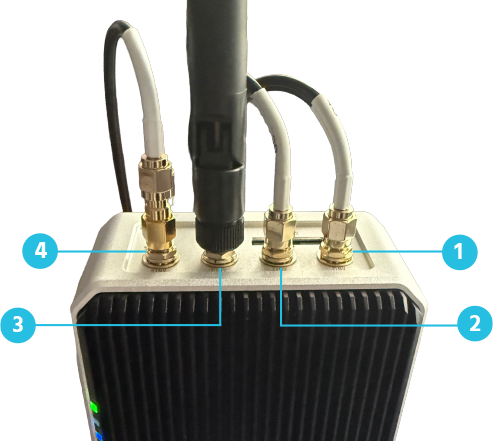
Diagram Label | Device Label | Function |
1 | ANT1 | LTE |
2 | ANT2 | GPS |
3 | ANT3 | Wi-SUN |
4 | ANT4 | Wi-Fi / BT |
LED Patterns
The BRD41 includes six LEDs. LEDs 4, 5, and 6 are reserved for future use or system-level operation.
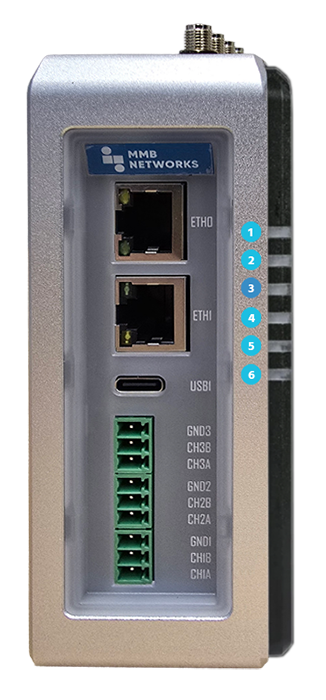
PWR (LED 1) | Description |
ON Green | Device is connected to power |
OFF | Device is not connected to power |
ACT (LED 2) | Description |
Green | In normal operation, flashing here signifies storage access. If there is any error during booting, the LED will flash an error pattern. |
USER (LED 3) | Description |
Red | Wi-SUN interface not associated / error / daemon unavailable |
Green | Wi-SUN interface associated, but no nodes connected |
Blue | Wi-SUN interface associated, nodes connected |
Built-In UPS Protection
The BRD41 includes an integrated uninterruptible power supply (UPS) designed to protect the device during sudden power loss. In the event of an outage, the UPS provides short-term backup power, allowing the system to safely shut down, preserve critical data, and maintain network stability. This helps prevent data corruption and reduces the risk of device or configuration issues when power is restored.
How it works:
- Under normal operation, the UPS remains charged while the device is powered.
- Depending on how the system is loaded, the UPS typically provides 30 seconds of power if external power is lost.
- The UPS allows the system to maintain operations in the case of a short power interruption. If power is not restored, the device will perform a controlled shutdown.
- Once power returns, the device resumes normal operation.