
WSK10 Getting Started
MMB Wi-SUN Evaluation Kit (WSK10): Getting Started Guide
This self-service support portal is designed to guide you from the initial unboxing of your WSK10: MMB Wi-SUN evaluation kit to advanced network management and troubleshooting. Our Wi-SUN certified solutions enable the deployment of interoperable, future-ready networks for utility and industrial applications.
The instructions in this guide will allow you to assemble a Wi-SUN border router (BRD41), connect two Wi-SUN router nodes (WCM20), and perform end-to-end communication from the network management system (MMB NMS) to the inputs and outputs of the WCM20s.
Table of Contents
What’s in the Box
What you’ll need for assembly
BRD41 Device Overview
- Quick Assembly
- Power
- Antenna Connections
- LED Patterns
- Built-In UPS Protection
WCM20 Device Overview
- Quick Assembly
- LED Patterns
- I/O Connection Electrical Ratings
Network Management System (NMS)
- Quick Tour of BRD41 Dashboard
- BRD41 Dashboard Metrics
- Quick Tour of WCM20 Dashboard
- WCM20 Dashboard Metrics
Troubleshooting & Technical Support
- FAQ Section
- Support & Escalation
What’s in the Box
Your evaluation kit contains the following hardware components
required to establish and monitor a robust mesh network:
BRD41-WBR: Wi-SUN Border Router (x1)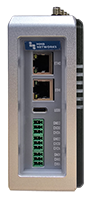
The MMB Gen 2 Wi-SUN Border Router is an industrial, DIN rail mountable, single board Linux computer that serves as the gateway between your mesh network and upstream cloud services. It can connect to the internet via Ethernet (ETH0).
WCM20: Collector & Mesh Extender (x2)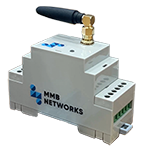
Multi-purpose Wi-SUN nodes that function as both data collectors and mesh extenders. These devices aggregate data from field endpoints and extend network coverage by relaying communications across the mesh, improving range and reliability in test environments. In this kit we will show you how to also use their input and output functions.
Wi-SUN Antennas (x3)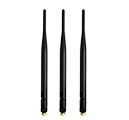
External antennas designed to optimize Wi-SUN network performance. They enhance signal strength and range for the border router and mesh devices, supporting stable and reliable wireless communication.
Power Supply for BRD41 (x1)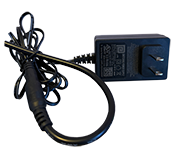
Dedicated power adapter for the BRD41 border router platform, ensuring consistent and reliable operation during evaluation and testing.
USB-C to USB-A Cable (x2)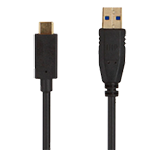
Used to power and/or connect the WCM20s to the BRD41 or to your PC to both power them and allow you to configure and monitor the devices through their CLI.
Wi-Fi, GPS/GNSS, LTE Antenna and RP-SMA adapter for Wi-Fi (x1)
Multi-band antenna supporting Wi-Fi, GPS/GNSS, and LTE connectivity, along with an RP-SMA adapter for Wi-Fi compatibility. Enables extended connectivity options for advanced evaluation scenarios.
Ethernet Cable (x1)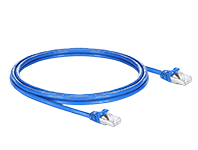
Provides a wired connection between the border router (ETH0 port) and your local network, enabling access to the device interface, configuration tools, and external systems.
Pushbutton Toggle Switch (x2)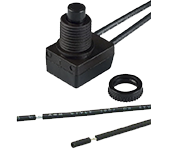
User-input component that can be connected to WCM20 input terminals for manual control or event triggering.
LEDs for connecting to the WCM20 Output (x2)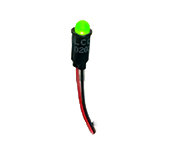
Indicator LEDs designed for connection to WCM20 outputs, allowing users to visualize device states or network-triggered events.
What you’ll need for assembly
To get started, you’ll need a few basic items not included in the kit. A flat head screwdriver is required for working with terminal block connections. Ensure you have an active internet connection for setup and testing. If you plan to use wireless backhaul (Wi-Fi, GPS/GNSS, or LTE) instead of wired Ethernet, place the device in a location with clear access to the sky to ensure reliable signal performance.
- Flat head screwdriver for terminal block
- Internet connection for BRD41
- Clear sky access for GPS and LTE (if not using Wired Ethernet)